
Taylor C722 Error Codes
& Troubleshooting Guide
Every fault message the Taylor C722 can display — BEATER OVERLOAD, HPCO COMPRESSOR, thermistor failures, temperature lockouts — with operator reset steps, root causes, and genuine Taylor OEM parts linked directly to our store.
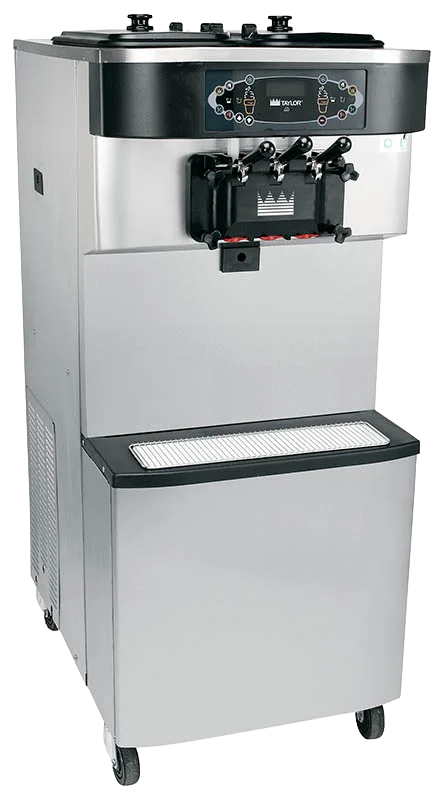
- Every C722 display fault code with fix steps
- BEATER OVERLOAD & HPCO reset procedures
- Left/right side thermistor fault sub-codes
- Temperature lockout thresholds (°F & °C)
- Operator-resettable vs. service-required faults
- Full 14-problem troubleshooting table from Manual 080568-M
- Official Taylor C722 parts replacement schedule
- OEM Taylor ice cream machine parts linked to our store
The Taylor C722 twin twist soft serve freezer runs a blank fluorescent display during normal operation — any text that appears requires your attention. This guide covers every C722 fault code from Taylor Operator's Manual 080568-M Sections 5 and 8, with the fix steps for each and links to the genuine OEM Taylor replacement parts that resolve the most common issues. The C722 shares the same UVC4 control board as the C712, but has its own fault history, C722-specific parts, and some differences in the troubleshooting table. Taylor Upstate has been the only authorized Taylor distributor for Upstate New York since 1981.
Taylor C722 Display Fault Codes Explained
The C722 UVC4 control monitors beater motor load, compressor high-pressure cut-out, door position, and four thermistor probes (left/right hopper, left/right barrel). Faults appear on the fluorescent display and are logged in Fault History. The Manager's Menu access code for the C722 is 8309.
What it means: The beater motor has drawn excessive current and tripped its thermal overload protector. The most common Taylor C722 fault code we receive calls about — and in most cases it is a worn wear part, not a failed motor.
Common root causes: Worn or missing front bearing and beater shoes (X50350) adding drag on the motor; damaged C722 scraper blades (084978) catching on the cylinder wall; product too thick (viscosity control too cold); condenser dirty causing high ambient heat load; machine placed in Auto before all sanitizing solution was removed — which can freeze the cylinder and seize the beater.
Operator reset steps (Manual 080568-M Section 5):
- Place the power switch in the OFF position.
- Wait 5 minutes for the motor to cool before pressing reset.
- Locate the reset button on the left side panel of the C722.
- Press the reset button firmly. Never use a metal object — electrocution risk.
- Place the power switch back to ON.
- Press the Wash symbol and observe beater performance.
- If the beater runs correctly: press Wash to cancel, then press Auto to resume.
What it means: The refrigeration compressor's high-pressure cut-out (HPCO) safety switch tripped — the compressor detected excessive head pressure and shut itself down to prevent damage.
Common root causes: Dirty or blocked condenser fins; ambient temperature exceeds the C722 operating range (normal: 70–75°F / 21–24°C; max: 104°F / 40°C); air clearance on sides of the machine is less than the required 6 inches (standard C722) or 6 inches left / 0 inches right (top-discharge model); machine recirculating its own warm exhaust air.
Operator reset steps (Manual 080568-M Section 5):
- Place the power switch in the OFF position.
- Wait 5 minutes for the refrigeration system to equalize.
- Verify minimum 6 in. (152 mm) clearance on both sides of a standard C722, or 6 in. on the left / 0 in. on the right for a top-discharge model.
- Check condenser fins for dust and lint — clean with a soft brush monthly. Never use a metal probe between fins.
- For water-cooled models: verify the water supply valve is fully open and water is flowing.
- Place the power switch to ON and restart in Auto.
What it means: The control board detected a failure in the left (L) or right (R) hopper temperature probe. Without this probe, the machine cannot monitor mix temperature in the affected hopper for food-safety compliance.
Sub-codes that appear alongside this fault:
- SHRT — probe has shorted (resistance < 1 ohm)
- OPEN — probe circuit is open (resistance > 1 megohm)
- OVER — probe environment exceeded 200°F (93°C)
What it means: The freezing cylinder (barrel) thermistor probe on the indicated side has failed. The same SHRT / OPEN / OVER sub-codes apply as described in the hopper thermistor fault above.
The C722 has two independent freezing cylinders — a thermistor failure on one side will lock out that side while the other side may continue operating. This is a service-technician repair. Call 800-678-2956.
What it means: The control board detected corrupt data during initialization — typically following a power surge or uncontrolled power outage. The display reads: NVRAM FAULT / RESET TO DEFAULTS / PRESS SEL KEY.
Fix: Press the SEL key as prompted. The control resets to factory defaults. Re-enter any custom settings (clock, auto-start time, standby preferences) and the Manager's Menu access code 8309. If this fault recurs repeatedly, the control board may need replacement — call your Taylor service technician. Consider installing a quality surge protector on the machine circuit to prevent recurrence.
What it means: Every time the C722 powers on, the UVC4 control runs an initialization self-check (LANGUAGE, SYSTEM DATA, CONFIG DATA, LOCKOUT DATA). After completion, the SAFETY TIMEOUT screen holds with an audible alarm for 60 seconds, or until any key is pressed. This is normal behavior — not a fault. The number of hours remaining before the next required brush-cleaning is also displayed at this time. Press any key to dismiss.
Taylor C722 Temperature Fault Codes
These codes appear in the Fault History log when the C722 was in Auto or Standby and a mix temperature threshold was exceeded. The C722 monitors four temperature points: left hopper (L HPR), right hopper (R HPR), left barrel (L BRL), and right barrel (R BRL). All temperature faults are food-safety critical.
| Fault Code | Threshold / Duration | Meaning & Required Action |
|---|---|---|
| L/R HPR>41F (5C) AFTER 4HR | >41°F for >4 hours | Hopper mix was above 41°F (5°C) for more than 4 hours in Auto or Standby. Consult local health code — product discard typically required. |
| L/R BRL>41F (5C) AFTER 4HR | >41°F for >4 hours | Freezing cylinder mix above 41°F for more than 4 hours. Drain, full clean, sanitize, and reprime before restarting. |
| L/R HPR>41F (5C) AFTER PF | >41°F post power failure | Hopper above 41°F for 4+ hours following a power failure. Discard product per local health code. |
| L/R BRL>41F (5C) AFTER PF | >41°F post power failure | Cylinder above 41°F post power failure. Full clean-and-prime required before service can resume. |
| L/R HPR>45F (7C) AFTER 1HR | >45°F for >1 hour | Hopper exceeded 45°F (7°C) for more than 1 hour. More urgent than the 4-hour threshold — consult health code immediately. Check hopper cover is in position. |
| L/R BRL>45F (7C) AFTER 1HR | >45°F for >1 hour | Cylinder exceeded 45°F for more than 1 hour. Check refrigeration and ambient temperature. |
| L/R HPR>59F (15C) | >59°F at any point | Hopper mix exceeded 59°F (15°C) — critical limit. Discard product immediately per health code. Investigate refrigeration fault. |
| L/R BRL>59F (15C) | >59°F at any point | Cylinder mix exceeded 59°F — critical limit. Discard product immediately. Do not resume service until machine is inspected. |
C722 Fault History & Lockout History
Access via Manager's Menu — press the Cone/Menu symbol on the right side of the control panel, enter access code 8309, and use the arrow keys and SEL to navigate.
Fault History
Stores the last 100 fault events, each with date, time, and fault type. Page 1 is always the most recent. Your Taylor service technician will pull this log when diagnosing any recurring or intermittent C722 issue — it is the most valuable diagnostic tool on the machine. If you see a pattern of BEATER OVERLOAD events clustered around a specific time of day or ambient temperature, that context helps pinpoint the root cause.
Lockout History
A separate log tracking hard locks, soft locks, brush-clean completions, and aborted heat cycles. Up to 100 events stored. Page 1 is always the most recent.
Current Conditions
Displays live viscosity reading plus hopper and barrel temperatures for both the left and right sides simultaneously — formatted as three rows: VISC / HOPPER / BARREL with L and R columns. Use this to verify the C722 is actually at serving temperature before drawing product after a long Standby period.
Taylor C722 Full Troubleshooting Guide
Every problem from Table 8-1 of Taylor C722 Operator's Manual 080568-M — with probable causes, remedies, and OEM Taylor ice cream machine parts linked where applicable. The C722 troubleshooting table differs from the C712 in several entries because of the C722's distinct mix pump and two-cylinder design.
| Problem | Probable Cause | Remedy | Level |
|---|---|---|---|
| 1. No product dispensed | Mix Out light on — low on mix | Add mix to hopper. Press Auto to resume. | DIY |
| Power switch in OFF position | Turn power switch to ON and select Auto. | DIY | |
| Machine not in Auto mode | Select Auto and allow machine to cycle off before drawing product. | DIY | |
| BEATER OVERLOAD displayed — motor on reset | Turn machine off. Wait 5 min. Press reset button on left side panel. Restart in Auto. See Section 1 above. | DIY | |
| Pump motor control on internal overload | Turn power switch off. Remove and clean the mix pump (X69928-14S). Wait at least 2 minutes with power off. Restore power. Before reinstalling pump, press Pump key and verify shaft rotates counterclockwise. If clockwise, call service. | DIY | |
| Feed tube or check ring (056524) not properly installed | Verify the C722-specific feed tube left (X69919) or right (X69924) and rubber check ring are correctly installed per assembly procedure. | DIY | |
| Butterfat buildup in pump | Carefully remove the mix pump assembly (X69928-14S). Clean the pump valve gasket (086097) and all pump components. Reinstall dry — do not lubricate the gasket or red O-ring. | DIY | |
| Freeze-up in mix inlet hole | — | SERVICE | |
| Mix pump ball crank broken | — | SERVICE | |
| 2. No control panel functions with power ON | Machine unplugged / circuit breaker tripped or fuse blown | Plug in or turn breaker ON / replace fuse. Never exceed the fuse rating on the machine data label. | DIY |
| 3. Product too stiff | Draw rate set too fast | Adjust draw rate to 5–7½ oz. (142–213 g) per 10 seconds using the adjustment screw on the draw handle (X56421-1). Loosen the screw to decrease flow rate. | DIY |
| 4. Product too thick | Freezing cylinder not primed correctly | Drain the freezing cylinder and reprime the machine with fresh mix. | DIY |
| Air/mix pump incorrectly assembled | Disassemble the C722 pump assembly (X69928-14S). The red piston O-ring and red valve cap O-ring must NOT be lubricated. The pump gasket (086097) must be installed dry. Reinstall per manual. | DIY | |
| Viscosity control set too cold | — | SERVICE | |
| Freeze-up in mix inlet hole | — | SERVICE | |
| 5. Mix in hopper too warm | Hopper cover not in position | Clean, sanitize, and place the hopper cover (X69146) in position. | DIY |
| Agitator not installed (agitator-equipped units) | With sanitized hands, place the agitator on the agitator driveshaft housing. If it stopped turning during operation, remove, brush-clean with sanitizing solution, and reinstall. | DIY | |
| 6. Mix in hopper too cold | Hopper temperature out of adjustment | — | SERVICE |
| 7. Mix level probes not functioning | Milkstone buildup on sensing probes in hopper | Clean hoppers thoroughly using the 3"×7" hopper brush (023316). Scrub the mix-level sensing probes directly. | DIY |
| 8. Mix pump will not operate | Pump motor control on internal overload | Turn power switch off. Remove and clean the mix pump (X69928-14S). Allow at least 2 minutes with power off for the control to reset. Restore power — before reinstalling, press Pump key and verify shaft rotates counterclockwise. If clockwise, call service. | DIY |
| 9. Product collecting on top of door | Top O-ring on draw valve (083693-SER) improperly lubricated or worn | Lubricate with Taylor Lube (047518) or replace the O-ring. | DIY |
| 10. Excessive mix leaking from bottom of door spout | Bottom O-ring on draw valve (083693-SER) improperly lubricated or worn | Lubricate with Taylor Lube (047518) or replace the O-ring. | DIY |
| 11. Excessive mix leakage into rear drip pan | Driveshaft seal (032560) improperly lubricated or worn | Lubricate or replace the driveshaft seal. | DIY |
| Driveshaft seal installed inside-out | The middle section of the boot seal must be convex (extending outward). If concave, the seal is inside-out — remove and reinstall correctly. | DIY | |
| Inadequate lubrication of driveshaft | Apply even coat of Taylor Lube (047518) to driveshaft. Never lubricate the hex end. | DIY | |
| Driveshaft and beater assembly working forward | — | SERVICE | |
| Worn rear shell bearing | — | SERVICE | |
| Gear box out of alignment | — | SERVICE | |
| 12. Driveshaft stuck in drive coupling | Mix and lubricant collected in drive coupling | Brush-clean the rear shell bearing area at every manual brush-clean using the black bristle brush (013071). | DIY |
| Rounded corners of driveshaft or drive coupling | — | SERVICE | |
| Gear box out of alignment | — | SERVICE | |
| 13. Freezing cylinder walls scored | Front bearing/beater shoes (X50350) missing or worn | Install or replace the front bearing and shoe kit. | DIY |
| C722 scraper blades (084978) damaged | Replace both blades — always as a pair. The blade hole must fit securely over the pin on the beater helix before installing. | DIY | |
| Machine placed in Auto before all sanitizing solution removed from cylinder | Always complete the priming flush before selecting Auto. This is the most preventable cause of cylinder scoring on the C722. | DIY | |
| Broken freezer door baffle rod | Replace freezer door (X68889-SER). | SERVICE | |
| Broken beater pins | Replace C722 beater assembly (X80291). | SERVICE | |
| Beater assembly bent | Replace C722 beater assembly (X80291). | SERVICE | |
| Gear box out of alignment | — | SERVICE | |
| 14. Product makes popping sound when drawn | Draw rate set too fast | Adjust draw rate to 5–7½ oz. (142–213 g) per 10 seconds. | DIY |
| Pump assembled incorrectly | Disassemble and reassemble the C722 pump. Red O-rings on piston and valve cap must NOT be lubricated. Pump gasket (086097) must be dry. | DIY | |
| Freezing cylinder not primed correctly | Drain and reprime the affected cylinder fully with fresh mix. | DIY |
Taylor C722 Parts Replacement Schedule
Taylor's official C722 wear parts schedule. Following this eliminates the vast majority of scored cylinders, product leaks, BEATER OVERLOAD faults, and bacterial count failures — and is required to maintain your Taylor warranty. All parts below are genuine OEM Taylor stocked in our Troy and Marcellus, NY warehouses.
| Part | Part No. | Every 3 Mo. | Every 6 Mo. | Annually |
|---|---|---|---|---|
| Blade-Scraper-Plastic C722 | 084978 | ✓ | ||
| Seal-Drive Shaft (boot seal) | 032560 | ✓ | ||
| Gasket-Door HT 4"-Double | 048926 | ✓ | ||
| Kit A.-Beater-Front Shoes-Bearing | X50350 | ✓ | ||
| O-ring Draw Valve 7/8 OD SIL | 083693-SER | ✓ | ||
| O-ring Feed Tube & Prime Plug 1/4 OD | 015872-SER | ✓ | ||
| O-ring Pump Piston 2-1/8 OD Red — DO NOT LUBRICATE | 020051-SER | ✓ | ||
| O-ring Prime Plug 1/2 OD | 024278-SER | ✓ | ||
| Gasket-Simplified Pump Valve — DO NOT LUBRICATE | 086097 | ✓ | ||
| Ring-Check-Feed Tube | 056524 | ✓ | ||
| O-ring Pump Driveshaft 1/2 ID | 048632-SER | ✓ | ||
| Black Bristle Brush 1"×2" | 013071 | Inspect and replace as needed (min. annually) | ||
| Brush-Double End | 013072 | Inspect and replace as needed (min. annually) | ||
| Brush-Draw Valve | 013073 | Inspect and replace as needed (min. annually) | ||
| Brush-Mix Pump Body 3"×7" | 023316 | Inspect and replace as needed (min. annually) | ||
Taylor C722 Troubleshooting — Common Questions
Genuine Taylor C722 Parts — Same-Day Shipping
Taylor Upstate stocks the complete C722 OEM parts line from our Troy and Marcellus, NY warehouses — scraper blades (084978), driveshaft seals, front bearing kits, pump assemblies, O-rings, draw valves, brushes, Taylor Lube, Stera-Sheen. All genuine Taylor soft serve ice cream machine parts. Factory-trained C722 service across all of Upstate New York. Call 800-678-2956.
